Back and lay on IPL, Tests and T20sUPI deposit from ₹100Withdrawals from ₹500Odds refresh every 8 secondsDesk on WhatsApp 9 AM to 2 AM

Pick the Right 99Exch Key Fast: Real ID or Practice Demo

Login wants the username and password the 99Exch desk sent you on chat. It opens your own wallet: deposits from ₹100, withdrawals from ₹500.

Ask for a Real 99Exch ID, Built in 6 to 9 Minutes

Login with Demo ID is a key on the official 99Exch screen itself. Practice figures only. We do not issue demo IDs, and nothing in the demo can be withdrawn.

Ready for real money later? Read how the two boxes behave on the 99Exch login page.

Welcome to 99Exch — Clear Answer on Which Sign-In Key a Newcomer Should Press

No username yet? Then the Login key on the Welcome to 99Exch card cannot help you today. Start with a WhatsApp message to the 99Exch desk, which builds an ID in 6 to 9 minutes, add ₹100, and come back to press Login. The second key, Login with Demo ID, is only a practice room with nothing to withdraw.

Get the Real ID That Opens the Login Key
Welcome to 99Exch sign-in card showing the Login key above the Login with Demo ID key

A Clear Map of the Welcome to 99Exch Screen, Top to Bottom

Short version: it is a sign-in card. Everything else on the Welcome to 99Exch screen is a shortcut to something that happens somewhere else.

We opened it on 9 Oct 2026 on 99exch.red and on 99exch.com, at a phone width of 390 pixels, and both addresses served the same 99Exch build with the same elements stacked in the same order, which is reassuring if you ever switch address halfway through a match. The 99Exch logo sits above the card. Inside, a small heading reads Login. Below that you get two boxes, two keys, a line of fine print, and three long rows that have nothing to do with signing in.

Element on the cardWhat it doesUse it when
User Name boxTakes the username the 99Exch desk created for youYou already hold a real ID
Password boxTakes the password that came with that usernameStraight after the username
Login keyChecks both boxes and opens your real 99Exch walletBoth boxes carry real details
Login with Demo ID keyOpens a practice entry with no real balance behind itYou want a look before paying anything
reCAPTCHA noticeSays the page is protected by Google reCAPTCHANever; it is text, not a key
Download .apk rowFetches the Android app fileYou would rather use an app than a browser
Contact On Whatsapp rowOpens a WhatsApp chat from the screenYou want to talk to someone before signing in
Share This Apk to Friend rowPasses the app file on to another phoneA friend asks where your app came from

Only two of those matter on day one. Login and Login with Demo ID sit directly one above the other, they are the same width, and each carries the same small arrow icon, which is probably why so many people message the 99Exch desk asking which one is meant for them. (They are not interchangeable. Most of this page is about that.)

What the card does not have is a sign-up key. No Register button, no form for your name, no box for a phone number. A 99Exch account is never created on this screen; the desk builds it over WhatsApp and you only bring the finished username back here to type it in. People miss this constantly and spend a few confused minutes tapping around the welcome 99exch card for a joining option that simply isn't there.

The three lower rows deserve a sentence each, because newcomers sometimes press them by accident. Download .apk starts a file download, nothing more. Contact On Whatsapp leaves the browser and opens a chat. Share This Apk to Friend opens your phone's share sheet. None of them signs you in, and none of them changes what the two keys above do.

On a laptop the picture barely changes. At 1366 pixels wide the card stays a narrow column in the middle of the page, the same eight pieces in the same order, with no sidebar and no hidden register link tucked in a corner. Small details help once you know them: a person icon sits inside the User Name box, a key icon inside the Password box, and a dashed line divides the sign-in half of the 99Exch card from the three rows underneath. Everything above that line is about getting in. Everything below it is about getting help or getting the app.

Two-Key Chooser: Real 99Exch Login or the Free Demo ID Key

Choose by what you want from the next ten minutes.

Press Login on 99Exch when

  • you already have a username and password from the 99Exch desk
  • you want your own balance, your deposits and your withdrawals
  • you plan to back or lay a real market tonight
  • you have moved to another working address and want the same wallet back

Press Login with Demo ID when

  • you have no ID yet and just want to see the 99Exch layout
  • you would like to practise reading a market before money goes in
  • figures that are not real money are fine with you
  • you have no plan to withdraw anything

Login is the real door. Behind it sits a 99Exch wallet that holds what you deposited, settles what you won or lost, and lets you request a withdrawal once the balance reaches ₹500, the floor the desk works to. Demo is a rehearsal. Its balance is not money, nothing you do inside it carries over to a real account, and no withdrawal ever comes out of it, however well a practice bet goes.

That is the theory. In practice it gets tangled in one predictable way: somebody presses the demo key, has a lively evening on practice figures, and then messages the 99Exch desk asking how to cash the number out. It cannot be cashed. The figure was never a balance in the first place, and the desk has no way to turn it into into one.

Wrong key, wrong expectations.

One more point, since the welcome to 99exch login question arrives so often. We do not issue demo IDs and nobody on our side can make one for you, because the demo entry is a key printed on the official 99Exch screen and that is the whole of it; if someone offers to sell you a demo ID for a fee, they are charging for something the screen already hands out to anyone who taps it. A real 99Exch ID is different. It is made for you, by name, against your WhatsApp number, and it is the only thing that makes the Login key work.

Coming back after a few weeks away? Still Login. Your 99Exch ID does not expire just because you stopped using it, and the card will not suggest the demo key to returning users, so press the one you used before. Forgot the username itself? The desk can find it if you message from the registered number and quote the amount of your last deposit; the recovery steps are laid out on the 99Exch ID page linked further down.

Simple 99Exch Newcomer Path: Get an ID, Add ₹100, Place a First Bet

Roughly fifteen minutes from first message to first bet on a quiet afternoon. A little longer at night.

  1. Write to the 99Exch desk on WhatsApp. Hours are 9 AM to 2 AM IST with no day off, and a reply typically takes around 4 minutes. Your message needs four things in any order: your name, the number you are writing from, a username idea, and a yes to a first deposit. No ID card, no upload of any kind.
  2. Wait for the ID. Most new 99Exch IDs are ready in 6 to 9 minutes; on a busy evening close to a big match it can stretch to 15. Usernames run 4 to 14 characters, letters and digits only, so if your first pick breaks that rule the desk will suggest something close. Every detail of that step is on the 99 Exchange sign up page, four details and the timing.
  3. Back on the Welcome to 99Exch screen, use the upper key. Copy the details from the chat letter for letter, capitals too, and press Login. The demo key below it will not take them.
  4. Add your first ₹100. That is the smallest deposit the 99Exch desk accepts. UPI, bank transfer and three wallet options all work, and no fee is taken on the deposit or on a later withdrawal.
  5. Place one small bet. Open a cricket match, pick a side, then either back it (you win if that side wins) or lay it (you win if it loses). The board on 99Exch live, where the match list refreshes every 8 seconds, lays out every market type in one place.

A sample first evening makes the timing easier to picture. Say you message the 99Exch desk at 8:40 PM during an innings break; a reply lands four or five minutes later, the ID follows at about 8:50, you press Login, send ₹100 by UPI, and you have a back bet on the second innings well before nine. If the desk is swamped that night, push everything back by five or six minutes. Rarely more than that.

So where does the demo fit in? For some people it is worth ten minutes before step one, purely to see where the markets sit on the 99Exch screen and how back and lay prices are arranged next to each other. Others skip it entirely and do fine. Hard to say which is better, it mostly depends on whether you have used an exchange before or only a fixed-odds book, where you can only ever back.

A small trap at step three: people paste the password from the chat and pick up a trailing space with it. The Login key then rejects details that look perfect on screen. Type it by hand the first time, and save it properly afterwards.

Missed the message because you stepped away? Nothing is lost. The username and password simply wait in the WhatsApp thread, and the Login key on the 99Exch card accepts them whenever you come back, an hour later or the next day. The only clock that runs is the session timer, and that starts after you sign in, not before.

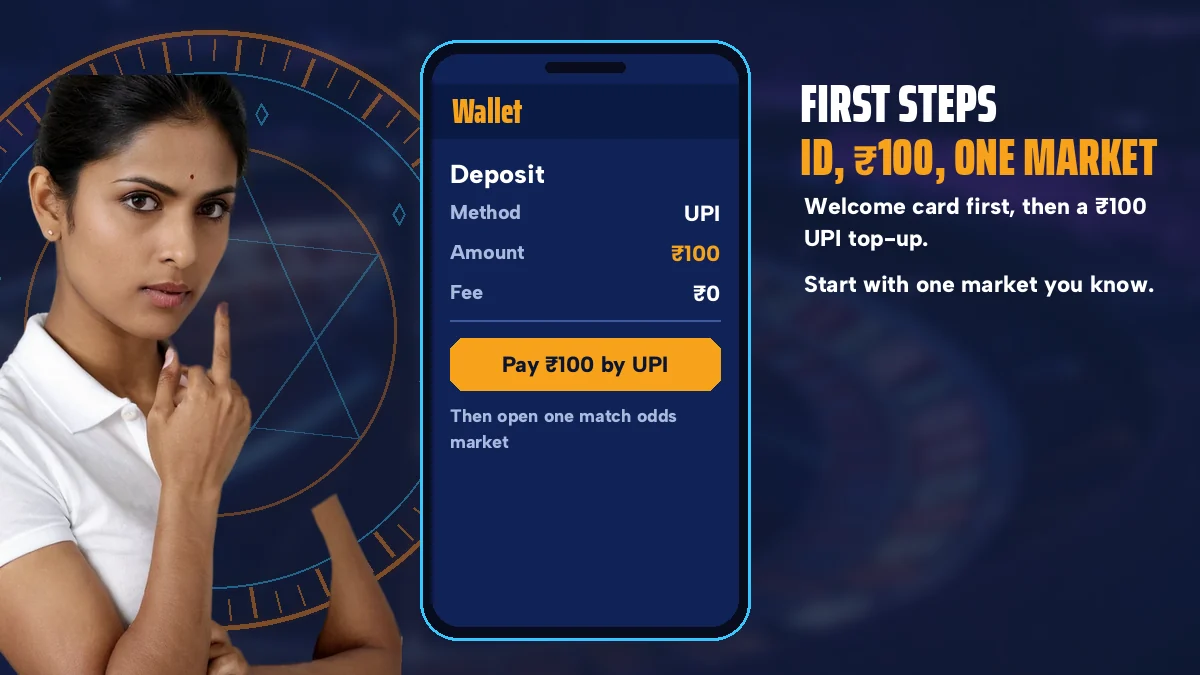
Newcomer moving from the welcome sign-in card to a first ₹100 UPI deposit on a phone
From the welcome card to a first 99Exch bet: the ID first, then ₹100, then one market.

Fast 99Exch Help When a Welcome Screen Key Does Not Respond

Most trouble on this card comes from three places: a mistyped password, an address your network has blocked, or the wrong key pressed. Each one has a fix measured in minutes.

Login says your 99Exch details are wrong

Two causes cover nearly every rejection on this 99Exch card. One is the username, short enough that a single wrong letter or a capital in the wrong place breaks it, so compare it against the chat character by character. The other is the password, and only the 99Exch desk can change that: there is no forgot-password link on the card, nothing resets on its own, and a reset over WhatsApp takes about 3 minutes. Repeat failures and lockouts are covered on the 99Exch login walkthrough of both boxes.

The welcome card will not load on one address

Betting domains get blocked at the ISP level in India, often without notice, and that is exactly why 99Exch runs on more than one address. On 9 Oct 2026 the same sign-in app answered on 99exch.com, 99exch.red, 99exch.green, 99exch.live and 99exch.win, so if one stalls on your connection, try the next. Your ID and your balance are identical on every one of them.

Two addresses behaved differently that day. 99exch.io returned a 404 and showed nothing at all. 99exch.in redirected to a third-party ID-provider site rather than the official 99Exch screen, so do not type a password there, whatever its welcome text says.

You keep landing back on the welcome card

Usually the idle timer. A web session on 99Exch closes after 20 minutes without activity, the app allows 45, and either way you end up on this card again with both boxes empty. Press Login, type the details, carry on.

The reCAPTCHA line looks like an error

It is not one. That small print under the two keys only says the 99Exch page is protected by Google reCAPTCHA, with links to the Google Privacy Policy and Terms of Service. When we tested, there was no tick-box to fill on the card, so if Login fails, the cause is almost always the details typed in the boxes, not this notice.

No reply on WhatsApp

Look at the clock before anything else. The desk works 9 AM to 2 AM, so a message sent at 3 AM waits for the morning shift. Inside those hours the median reply is 4 minutes, a little slower on match nights when everyone wants an ID at once. The desk number is +91 81097 11726, shown here as text for you to save in your contacts.

About the Download .apk row

It fetches the Android app, roughly 22 MB, which needs Android 7.0 or newer. There is no iPhone build; on an iPhone, people add the sign-in screen to the home screen instead. The welcome card inside the app asks for the same 99Exch username and password as the browser does, so nothing new is needed.

Stuck card, quick rule: details rejected means a desk reset in about 3 min. Blank screen means the next working address. Back on the card mid-session means the 20 minute idle timer, so press Login again.

If none of that matches what you see, send the desk a screenshot of the card with the address bar visible. It saves a round of questions, which on a busy evening can save more time then anything else on this list.


Trusted 99Exch Welcome Searches Matched to the Right Key

People reach this card by typing it four ways: welcome to 99exch, welcome 99exch, welcome to 99 exch and welcome 99 exch. All four point at the same 99Exch sign-in card and the same two-key choice described higher up.

Where welcome to 99exch login lands on this page

That phrase is about the Login key in particular, the one that needs a real username and password from the 99Exch desk. The two-key chooser near the top answers it, and the sign-in strip under the menu shows both boxes.

Welcome 99exch com and the other working addresses
  • 99exch.com served the welcome card when tested on 9 Oct 2026
  • 99exch.red, .green, .live and .win served the same build that evening
  • 99exch.io gave a 404, and 99exch.in went to a third-party site
Welcome to 99 exch, written with a space

How the spaced form reaches the same 99Exch card

Gap or no gap, the card at the end has the same Login and Login with Demo ID keys. A newcomer's order stays fixed:

  1. get a real ID from the desk on WhatsApp
  2. press Login, not the demo key
  3. make the ₹100 first deposit
Search typedWhat the person wantsKey to press
welcome to 99exchto know what the card iseither, by goal
welcome 99exchthe card itselfLogin, with a real ID
welcome to 99exch loginto sign in for realLogin
welcome 99 excha look before joiningLogin with Demo ID

Which welcome 99 exch key suits a very first visit

Demo, if you only want to look around. Login, once the 99Exch desk has sent your username. Nothing on the card itself creates an account.

Free 99Exch Demo Room: What Practice Shows and What It Cannot

Think of the demo key as a walk through a shop after hours.

You can see how a 99Exch market is laid out, where the back and lay prices sit side by side, and how the match list reorders itself, which on the real board refreshes every 8 seconds. You get used to the screen without risking ₹100 on a misread price, and for anyone who has only ever used a fixed-odds sportsbook, that alone can be worth a few minutes of tapping around before the first real deposit.

What it cannot show you is anything to do with money. No real balance means no feel for how a deposit lands, no withdrawal to try, no cash-out on a real position. We have not checked every corner of the demo either, so treat it as a look at the layout and not a promise that each of the five market types on 99Exch (match odds, bookmaker, fancy, session, premium) is there to practise.

What carries over to a real 99Exch ID

Your feel for the layout: where the keys sit, how back and lay prices read, how a market opens. That is all, and its enough for most people.

What stays behind in the 99Exch demo

Every practice figure, win or loss. A real wallet starts empty and fills from your first deposit, ₹100 at minimum.

Moving across is just the other key. Same Welcome to 99Exch screen, same address: leave the practice session, type your real username and password, press Login. One ID works on every working address and in the Android app, and a single WhatsApp number can hold up to 2 IDs; the limits, recovery steps and payout timings are on the 99Exch ID page with deposit and withdrawal times.

Still unsure which key is yours? If a username came to you on chat, it is Login. If nothing did, it is demo for now, or a message to the desk.

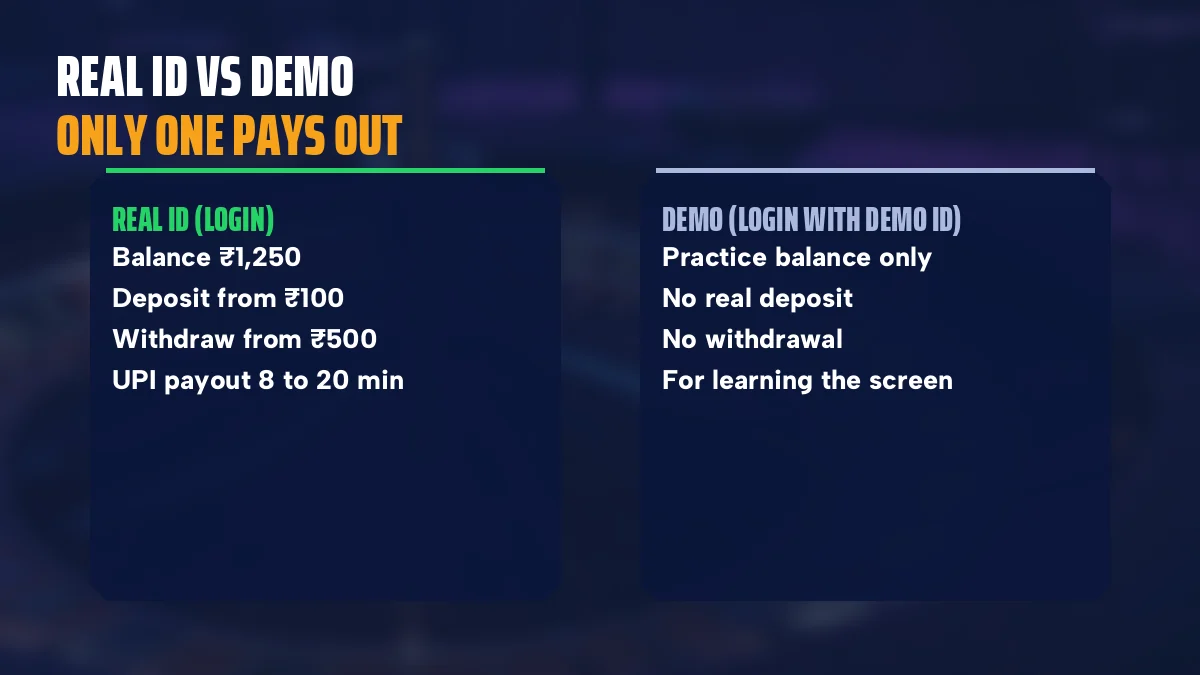
Side by side view of a real wallet balance and a practice-only demo balance
Real ID on one side, demo on the other: only the left one can ever pay out.

Quick Welcome to 99Exch Answers for First-Time Visitors

What does welcome to 99exch login mean?

It is the search people use when they want the real Login key on the Welcome to 99Exch card rather than the demo key beside it. That key works only with a username and password issued by the 99Exch desk, usually inside 6 to 9 minutes on WhatsApp, and it opens a balance you can withdraw.

Is welcome 99exch com the official sign-in screen?

Yes. On 9 Oct 2026, 99exch.com served the official 99Exch sign-in card with both keys on it. The same build also loaded on 99exch.red, .green, .live and .win, and one ID works on all of them. Skip 99exch.in, which redirected to a third-party ID site that day.

What is the welcome screen on 99Exch?

It is the first thing 99Exch shows on any working address, one narrow card headed Login. Two boxes take a username and password, two keys sit below them for real and practice entry, and three rows under a dashed line offer the .apk, a WhatsApp chat and app sharing. There is no register option.