
99Exch Login — Easy Sign-In to Bet Once the reCAPTCHA Check Clears
Two strings get you in, and the desk already sent you both on WhatsApp: a user name and a password. Put each one in its own box on the 99Exch card, tap Login (the top key, not the demo one under it) and the reCAPTCHA check does its work without asking you for anything. Still refused after that? The median desk reply is about 4 minutes.
Open the Real Sign-In Card, Then Tap the Top Key
Quick 99Exch Login: Four Moves Starting From the Chat the Desk Sent
Scroll up in your WhatsApp first. Somewhere in the thread with the 99Exch desk there is a message carrying your user name and your password, and that message is the only source either of them should come from. Not memory. Not a screenshot a friend forwarded. People who sign in cleanly on the first try nearly always have that message open on one half of the screen while they type on the other.
- Open a working 99Exch address in Chrome, or open the app if it is already on your phone. On 9 Oct 2026 the .com, .red, .green, .live and .win addresses all loaded the same sign-in card, and the plain, https and /m forms of the .com are set out on the 99Exch com login page if one of them stalls on your network.
- Type the user name into the User Name box. It is 4 to 14 characters of letters and digits, so a space anywhere in it is a slip of the thumb and not part of your ID.
- Type the password into the Password box, by hand, matching each capital letter.
- Tap Login once. Give it a few seconds. The reCAPTCHA check runs behind the card and, on the day we tested, never showed a puzzle at all.
That is the full 99Exch login. Four moves.
A lot of searches arrive phrased as 99 exchange login or 99 exchange id login, and it is worth clearing up what the second one means on 99Exch, because people sometimes go looking for a separate ID box that does not exist: your ID simply is the user name the desk made for you, the same string you type into User Name, and the screen has no third field for a number, a phone or an email. The same ID opens every working mirror and the app; the rules on how many IDs one number can hold, and how to get an ID back, sit on the 99Exch ID page.
No ID yet? Then there is nothing to log in with, and the order is the other way round: sign up first, wait for the chat, come back here. The four details the desk asks for and the 6 to 9 minute wait are covered on 99 exchange sign up, so this page will not repeat them.
The first 99Exch login on a brand-new ID
Do it straight away. When the chat with your new user name and password lands, sign in within the next few minutes, even if you are not planning to bet until the weekend. If something is off, a typo in how you noted the user name or a password you misread, you find out while the desk is awake and the thread is fresh, and not at the toss on match day when everyone else is messaging too. After that first clean sign-in, write down which address or app you used. Next time, start there.
99exch.in is the address to keep your password away from. When we loaded it on 9 Oct 2026 it bounced to a www page run by a third-party ID seller, not the official 99Exch screen, so anything typed into a box there goes to someone else. The five addresses in step 1 served the real card that day.
Clear Notes on All Eight Rows of the 99Exch Login Screen
The official 99Exch sign-in card is short. It has a heading that says LOGIN, two boxes, two keys, a small reCAPTCHA line, a dashed divider, and then three wide rows that each do something other than signing you in. Eight working parts in all, counting the boxes and keys. Most failed logins we hear about come from someone pressing the wrong one of the eight, which is why each gets its own note below rather than a single line.
User Name, the 99Exch ID box
The top box carries a small person icon on its right edge. It takes the user name from your desk chat and nothing else, so no phone number, no email. Usernames on 99Exch run 4 to 14 characters, letters and digits. If your phone keyboard offers to auto-capitalise the first letter, watch it, because the box will take whatever arrives. We treat both boxes as case-sensitive. It costs nothing to be careful.
Password, the 99Exch key box
Second box, with a key icon. Characters show as dots, so you cannot see a stray space or a wrong capital once it is typed; that is exactly where most refusals start. There is no eye icon to reveal the text on the screen we tested. Typing slowly is the fix, and copying from the chat is the risk (more on that in the next section).
Login, the real-money 99Exch key
The first wide key under the boxes. This is the one that checks your user name and password against your account and takes you to your own wallet, with your own balance. Every real bet placed on 99Exch starts from a tap on this key, and it is the only key on the card that does that.
Login with Demo ID, the 99Exch practice key
Directly underneath, and easy to hit by mistake on a small screen. It opens a practice entry: a demo balance that is not money, with no real withdrawal attached. Handy for looking around once. Not where your deposit lives. If you land somewhere and the balance looks wrong, this key is the first thing to suspect; how the whole first screen is laid out is covered under what the Welcome to 99Exch screen shows.
reCAPTCHA notice under the 99Exch keys
One line of small print saying the site is protected by reCAPTCHA and that Google's privacy and terms pages apply. It is a notice, not a task. The check behind it runs when you tap Login, and on 9 Oct 2026 it passed without showing a single image grid. If a puzzle ever does appear, finish it and tap Login again.
Download .apk on the 99Exch card
First of the three wide rows below the dashed line. It fetches the Android installer, which is a 22 MB file for Android 7.0 and newer. The same user name and password work inside the app; the install steps are on the 99Exch APK download page.
Contact On Whatsapp, the 99Exch desk row
Opens a chat with the desk. Open 9 AM to 2 AM, seven days. This is the row to use when Login keeps refusing you, rather than trying a tenth time.
Share This Apk to Friend, the last 99Exch row
As the label says, it passes the app download on to someone else. It does not share your ID, your login or your balance, and the friend still needs an ID of their own from the desk before the app is any use to them.
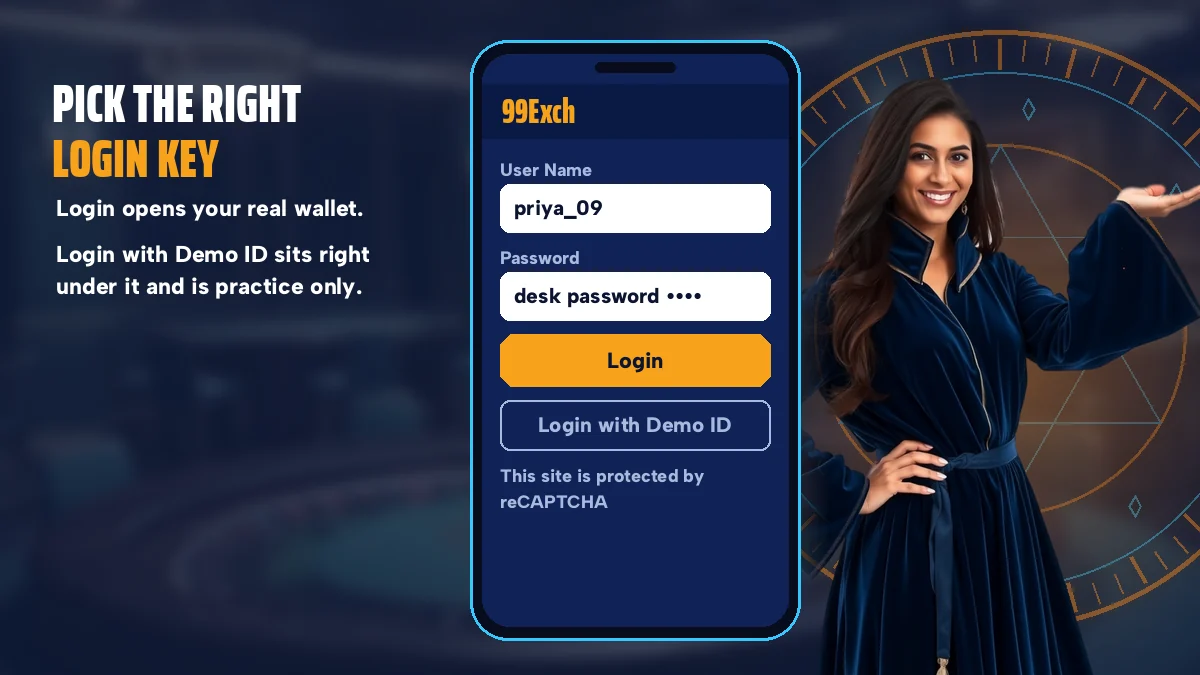
Placement matters more than it looks. On a phone held in one hand, with the 99Exch card filling the screen, the the two keys are stacked with very little gap, and they carry the same arrow icon on the right, so the only real difference between them is the two words after Login. Read them before you press.
99 Exchange Login Password: Simple 99Exch Habits That Spare You a Desk Message
Almost every refused 99 exchange login password comes down to the password not being quite the one the desk sent. Not hacked, not expired. Just different by one character. The 99Exch card does not tell you which box was wrong, it simply hands the card back, so you have to work it out yourself, and the habits below are the quickest way we know to stop that loop before it starts.
Start with pasting, since it causes the most trouble. A long-press copy from a chat bubble can pick up an invisible extra: a space at the end, sometimes the full stop after the password. Dots hide it. Ten seconds of typing by hand removes the risk completely, and if pasting is unavoidable, drop the text into a notes app, trim both ends, and copy it from there instead.
Autofill is the second. Chrome and most Android keyboards offer to save what you type, which is fine until you hold a second 99Exch ID (the cap is two per WhatsApp number) and the browser drops the old password into the box under the new user name. The fix is dull but it works: clear the box, type it fresh.
Capitals are the third. Passwords issued by the desk can mix upper and lower case, and a phone that auto-capitalises the first letter of every field will quietly change a lowercase first character. Turn the keyboard to lower case before you start, or check the first letter specifically.
Two 99Exch IDs on one number, two separate sets of details
One WhatsApp number can hold up to two 99Exch IDs, and each comes with its own user name and its own password. They are not interchangeable. The commonest mix-up is typing the user name of one ID with the password of the other, which the card refuses exactly as it would a wrong password, so it looks like the account is the problem when it is really the pairing. Keep the two desk messages apart, or save each pair under a clear label in your notes, and match them up before you tap Login.
A pattern the desk sees often enough to describe from memory: someone copies the password from the chat at the start of an IPL evening, it carries a trailing space, the card refuses it three times, and they decide the account is broken. They message in. The desk asks them to type it by hand. It works first time.
What a refused 99Exch login usually means
None of these are exact error messages, because the 99Exch card mostly just returns you to itself. They are the situations behind a failed sign-in, roughly in the order we would check them.
| What you see | Likely reason | What to do |
|---|---|---|
| Card comes back after you tap Login | One character off in either box: an extra space, a swapped capital | Clear both boxes and type each by hand from the chat |
| Card refuses a password that worked last week | Chrome or the keyboard remembered a stale entry and slipped it in | Delete the saved entry, type it fresh |
| You are inside but the balance is not yours | Login with Demo ID was tapped instead of Login | Go back to the sign-in card and use the top key |
| Back on the card in the middle of a match | The idle timer ran out: 20 minutes on the web, 45 in the app | Sign in again with the same details |
| The address does not load at all | That address is blocked on your network today | Open another working mirror; same ID, same balance |
| Still refused after two careful tries | Possibly a password problem only the desk can see | Message the desk with your user name |
The last row is where guessing should stop. Repeated wrong attempts can lead into a lockout, and how that works, along with the 3-minute desk reset, is explained on the page about fixing a refused 99exch com login rather than here. Send the desk your user name and one line about what the screen did. Do not send the password itself in a new message; the desk already has the account and does not need it.
People sometimes hunt the card for a forgot-password link. Below the two keys on the 99Exch screen we tested there are only the reCAPTCHA line and three wide rows, so the chat thread with the desk is effectively your password history, and it matters more then most people think. Archive it if the clutter bothers you. Do not delete it.
How Long a 99Exch Login Stays Open: a Clear Look at the 20 and 45 Minute Timers
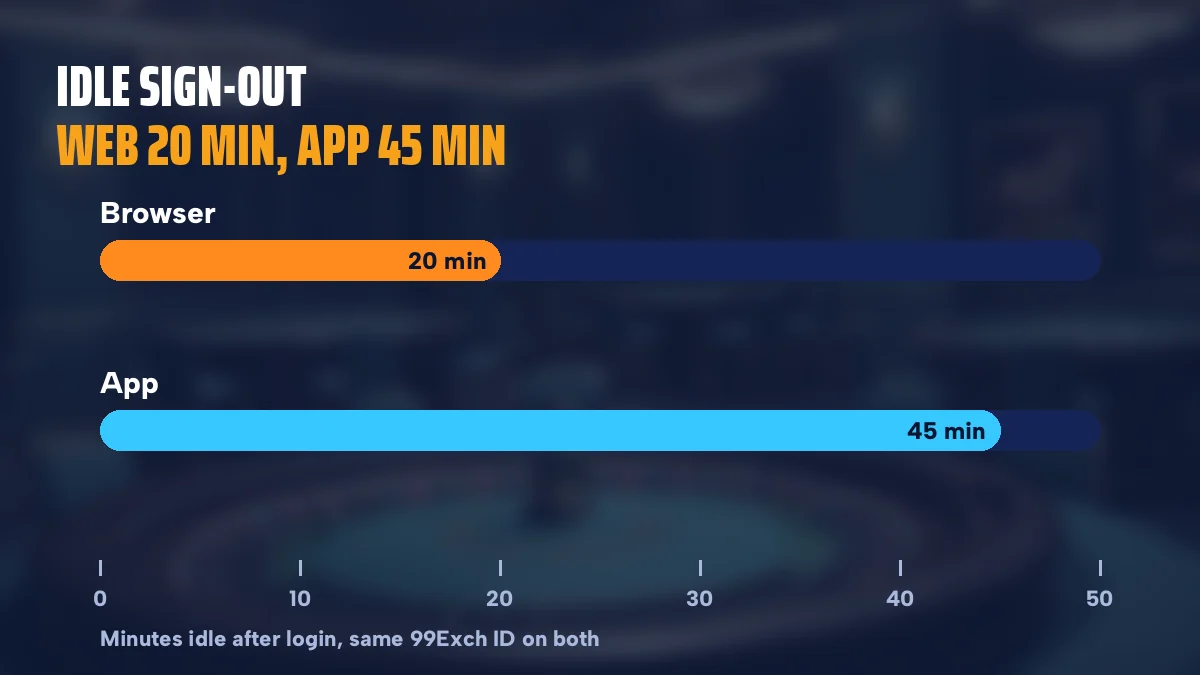
A 99Exch session does not last forever once you are in. Leave it alone for 20 minutes in a browser and it closes; in the app the allowance is 45 minutes. Idle time is what counts. The screen does not spell out exactly which taps reset that clock, so the safe reading is that any stretch where you are not using it is eating into the window.
A worked evening makes the gap clearer. Say you finish your 99Exch login in Chrome at 8:00 PM, look at the match odds, and put the phone face down at 8:05 to watch an over on TV. Come back at 8:26 and you have been idle for 21 minutes, one past the web limit, so the sign-in card is waiting for you again. Do the very same thing in the app and at 8:26 you are still inside, because the app would hold out until 8:50.
Being sent back to the card is not a fault on the account. Your ID, your user name and your password are all exactly what they were a minute earlier. Sign in again the normal way and you are back where you were. Why the app gets more than twice the web allowance is not explained anywhere on the screen; it just does, and for anyone who steps away a lot during a long innings that is probably the strongest practical reason to install it.
A few habits follow from the timers.
- Before a break in play, finish whatever you were doing on the 99Exch screen rather than leaving a half-typed stake open.
- On the web, assume you will be signing in again after any pause longer than a drinks break. Keep the desk chat handy so the user name and password are a scroll away.
- If you are on a shared phone, the timer is a small protection and nothing more; still close the tab when you are done.
- If the 99Exch card keeps appearing far sooner than 20 minutes, that is not the timer. Message the desk.
The desk itself works 9 AM to 2 AM, every day. A login problem at 3 AM will probaly wait until morning, so if you play the late finishes, check your details work early in the evening.
Searches people type before a 99Exch login
- 99exch login
- 99 exchange login
- 99 exch how to login
- 99 exchange login password
- 99 exchange id login
- how to get 99exch id
- 99 exch official
- 99exch app download apk
Every 99 Exchange ID Login Search Answered on One Trusted 99Exch Shelf
Whatever wording brought you here, the same card answers it. A 99exch login and a 99 exchange login are one action on one screen, typed with the user name and password the desk sent.
Wordings for the sign-in this card covers
Searched as 99exch login or 99 exchange login
Both phrasings land on the same official 99Exch card. Open a working address, fill User Name and Password, tap the top key. The spelling of the search changes nothing about the screen.
Searched as 99 exchange login password
The password is issued by the desk with the ID, never chosen on a form. If yours is refused, the habits on this page come first:
- type it by hand, not pasted
- clear any autofilled entry
- check the first capital
How each search maps to the box you fill on the 99Exch card
The table pairs the search with the exact place on the sign-in card it refers to.
| Search | Where it lands on the card |
|---|---|
| 99exch login | User Name, Password, then the Login key |
| 99 exchange login | The same card, same three moves |
| 99 exchange login password | The Password box, typed exactly as the desk sent it |
| 99 exchange id login | The User Name box, since the ID is the user name |
Searched as 99 exchange id login
Look at the card again: two boxes, no third one for a number. So a 99 exchange id login on 99Exch means putting the ID the desk gave you in the top box, which is labelled User Name rather than ID.
Practice entry through Login with Demo ID is a different key with a demo balance, so none of these searches should end there.
Seven 99Exch Login Questions From Real Searches, With Fast Replies
How do I log in to 99 Exch?
Open any working 99Exch address or the app, type the user name the desk sent into User Name and the password into Password, then tap Login. The reCAPTCHA check runs by itself. If the card refuses the same pair twice, stop guessing and message the desk with your user name.
Where do I get my 99 exchange login password?
It is the string in your desk chat, and the card wants it character for character. A 99Exch password can mix capitals with lower case, the Password box turns everything into dots, and a refusal never says which character slipped. So type it by hand, watch the first letter, and after two misses ask for a fresh one.
What is 99 exchange id login?
It is the normal 99Exch login under another name. Your ID is the user name the desk created, and typing it into the User Name box with its password is the whole ID login. One ID works on every working mirror and in the APK, so no address needs an ID of its own.
Why does 99Exch sign me out when I leave the screen?
The session closes after a stretch with no activity: 20 idle minutes on the web, 45 in the app. Nothing about your ID changes. You sign in again with the same user name and password. If you step away often during a match, the app gives you the longer window before that happens.
What does the Login with Demo ID key do on 99Exch?
Practice only. On 99Exch that second key loads a demo balance with no cash behind it and no withdrawal, which suits a first look at the markets and nothing more. Your deposit and any real bet sit behind the top key, Login, which needs the user name and password from your desk chat.
Do I have to tick a reCAPTCHA box on the 99Exch login screen?
No tick box appeared when we tested on 9 Oct 2026. The screen only carries a reCAPTCHA notice line under the two keys, and the check works in the background after you tap Login. If a puzzle ever does show up, complete it and then tap Login again.
Who do I contact if my 99Exch login still fails?
The desk, through the Contact On Whatsapp row at the foot of the 99Exch card. Save +91 81097 11726 as a contact so the thread is easy to find after a timeout. Hours are 9 AM to 2 AM, every day of the week. Half of replies land inside 4 minutes; a new password follows in roughly 3.
Next stops after your 99Exch login