
99 Exchange Com — Safe Main Address to Reach Your Account, Plus Tested Mirrors
Type 99exch.com, wait for a card asking for User Name and Password, and sign in with the details the 99Exch desk sent you. Tab stuck spinning? That is almost always your internet provider, since Indian ISPs block betting domains on their end. Open a mirror such as .red instead. Your 99Exch ID, password and balance are the same there, and the dated table below shows which endings worked when we checked.
Reach 99Exch on an Address That Loaded on 9 Oct
Why the Official 99Exch .com Address Stalls on Some Indian Networks
Picture a list kept by your internet company. Each betting domain the operator has been told to stop goes on it, and the check runs on their equipment before your request ever reaches 99Exch. Your username is on no such list. Only the address is, and that one difference decides what you do next on 99Exch.
That is why the exchange runs more than one working address. If your provider has cut off .com this week, the same sign-in app is sitting on .red, .green, .live and .win, and every one of them talks to the same 99Exch account server, which means the username the desk gave you, your password, your wallet figure and any bets already placed are all waiting there exactly as you left them on the address that stopped working.
Blocks are uneven, too. One phone on mobile data may get a blank spinning tab while a laptop on home Wi-Fi opens 99Exch on the first try, simply because two different providers keep two different lists. Nothing is wrong with either device.
A block is a property of the address and your network. It is never a property of your 99Exch ID, so switching addresses is safe and does not create a second account.
Three signs point to a provider block and not a typing mistake: the page never finishes loading, a plain notice from your operator appears where the 99Exch screen should be, or the browser reports that the site took too long to respond. In all three cases the fix is the same. Try a mirror.
One small catch. Being signed in on .com does not sign you in on .red, because your browser keeps a separate login for each address, so expect to type the username and password again after a switch. It takes under a minute (and the web session drops after 20 idle minutes anyway, so most people are re-entering details more often than they notice).
Seven 99Exch Addresses Checked on 9 October 2026 — Safe and Unsafe Rows
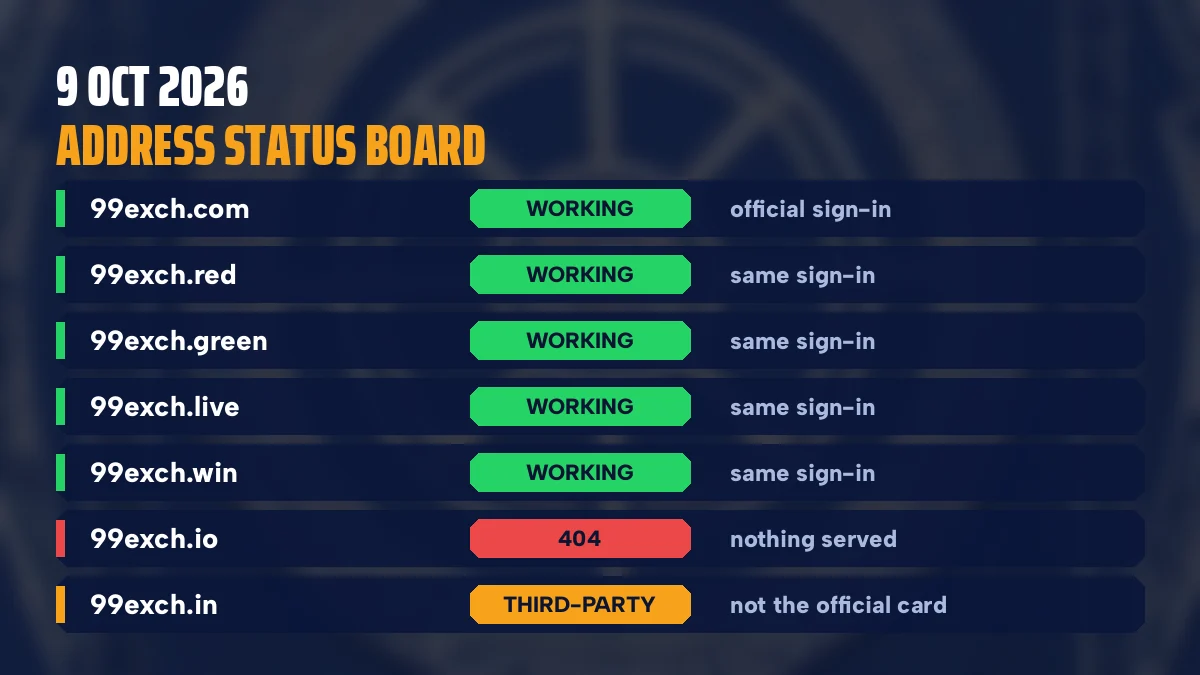
We opened each address in one sitting on 9 October 2026, starting at about 19:02 IST, and wrote down two things for each: did a page come back, and what was actually on it. That second question matters more than the first. A page loading is not proof that it belongs to 99Exch.
| Address | Result on 9 Oct 2026 | What it served | Safe to log in? |
|---|---|---|---|
| 99exch.com | Loaded (HTTP 200) | Official 99Exch sign-in app | Yes, first choice |
| 99exch.red | Loaded (HTTP 200) | Same sign-in app as .com | Yes |
| 99exch.green | Loaded (HTTP 200) | Same sign-in app as .com | Yes |
| 99exch.live | Loaded (HTTP 200) | Same sign-in app as .com | Yes |
| 99exch.win | Loaded (HTTP 200) | Same sign-in app as .com | Yes |
| 99exch.io | 404 error | Nothing, no sign-in screen | No, not working that day |
| 99exch.in | 301 to www, then loaded | A third-party ID-provider site | No, not official |
Five rows are green in practice: .com plus four mirrors, all serving one identical 99Exch sign-in build. The .io row is simply dead, and the .in row is the one to watch, because it looks alive and carries the brand name in the address while showing a page that 99Exch does not run.
A dated table like this is a snapshot. In practice a provider can add .red or .win to its block list next week, and an address that failed for us could open for you on a different network, so treat the date as part of the result and not as a footnote. If you are reading this much later then 9 October, the order of addresses below still holds; only the individual rows might have shifted.
Short answer? Start on .com.
Then use the mirrors in the order set out further down, and skip .io and .in entirely. Each mirror has its own page here with its single row and a few address-specific notes: the 99Exch .red mirror for when .com stalls and the 99Exch .green address that shares your wallet are the two people reach for most.
Reading Each Result: What a Safe 99Exch Sign-In Screen Shows
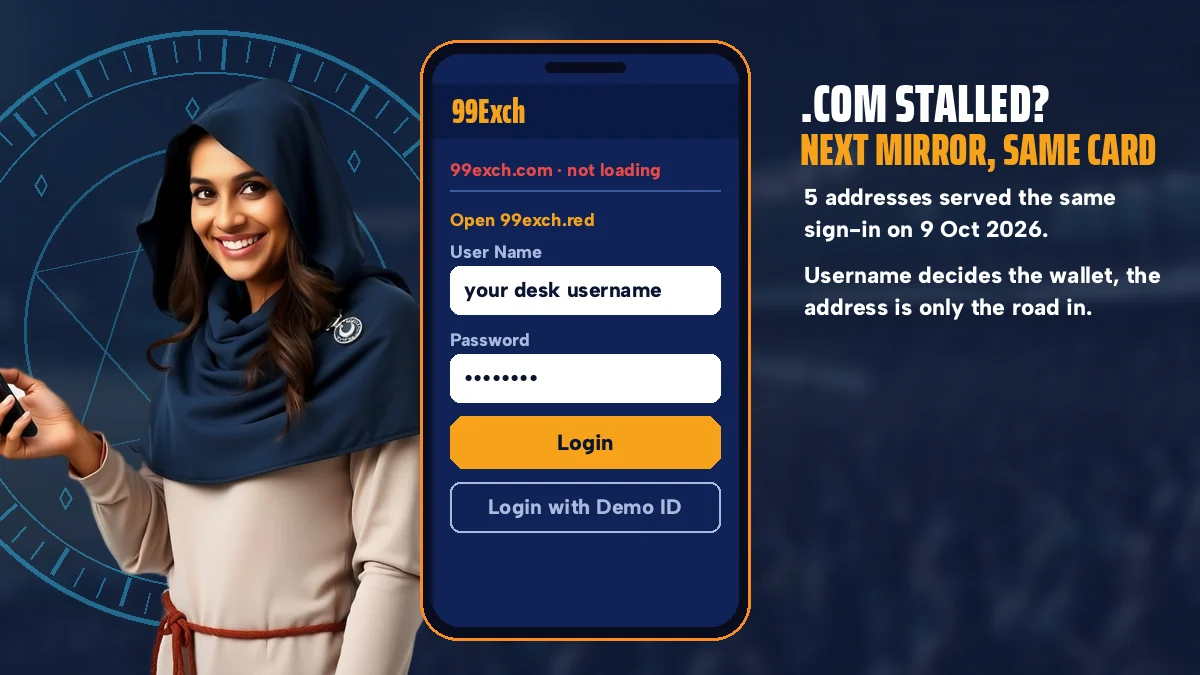
Every one of the five working rows above produced the same screen, and knowing that screen by sight is the quickest way to tell a real 99Exch address from a lookalike. It is a short card. Two input boxes, two buttons, a few rows underneath.
Safe signs on a real 99Exch address
Ask one question of the page: what does it want from you? On all five working 99Exch addresses the answer was two things, a username and a password. A practice entry sat beside the real one, a captcha line ran underneath, and the last rows offered the app file, the desk chat and a share option. Not one of them wanted money.
Reasons to close the 99Exch tab at once
A form asking for your phone number, a deposit or an "ID purchase" before any login box appears. A page that talks about providing IDs in general rather than showing the two fields. Any address ending we did not list as working on 9 October 2026.
Tap Login with Demo ID by accident and your money will seem to have vanished. It has not. That button drops you into practice mode with a pretend balance and no cash-out, which is easy to mistake for an empty wallet when you are rushing before a toss; go back and use the plain Login button. The tour of every element on the Welcome to 99Exch card explains the lower rows too.
Here is how a switch usually goes. Your .com tab keeps spinning on mobile data around the toss, you open 99exch.red in a fresh tab, the same two-field card appears, you type the same username and password, and the wallet shows the figure it showed on .com an hour earlier. Ninety seconds, roughly, and nothing on the 99Exch side changed.
Wrong password on a real card? Stay where you are. Hopping to .red or .win only gives the identical refusal, because the password belongs to the 99Exch account and all five addresses share that account. A desk reset over WhatsApp takes about 3 minutes, and the case where a new password keeps bouncing is handled on the 99Exch com login reset notes.
- 99 exch com m home
- https 99exch com login
- http 99exch red
- 99exch win
- 99exch green link
- 99exch com9
- 99exch io down
- 99 exch in official
- 99 exch official
- 99 exch how to login
- how to get 99exch id
- 99exch app download apk
Trusted 99Exch Address Searches Matched to the Right Answer
Where 99 exchange com points once it loads in this test
On 9 October 2026, 99 exchange com resolved to 99exch.com and returned the official 99Exch sign-in app, the same build the four mirrors served that evening.
If that address hangs on your network, the account is unaffected; open a mirror and use the same username.
How the https and m home searches are read on this page
These three searches all describe the .com address, typed with spaces instead of punctuation:
- https 99exch com means https://99exch.com, the secure form of the main address
- 99exch com m home gets blocked along with .com whenever a provider stops .com, so in our fallback order you try that path on .red next
- https 99exch com m home is the same phone view, typed the way a saved bookmark writes it out in full
Why 99exch xom shows up in the search box at all
Searching 99exch xom usually means a thumb landed one key left of c. Because no .xom ending exists, a phone browser hands the words to a search page, and on 9 October 2026 the safe fix was the same as always: retype .com, then confirm the two-field card before any 99Exch password goes in.
The 99exch io and 99 exch in rows explained without jargon
99exch io gave a 404 and no sign-in on the test date, so it was not a working 99Exch address that day.
99 exch in redirected to a www page run by a third-party ID provider; it is not the official 99Exch screen and should never get your login details.
| Search typed | Where it should take you |
|---|---|
| 99 exchange com | 99exch.com sign-in |
| https 99exch com | https://99exch.com |
| 99exch com m home | Mobile path on 99exch.com |
| 99exch xom | Fix the typo to .com |
| 99exch io | Not working on 9 Oct 2026 |
| 99 exch in | Third-party site, avoid |
Typed It Wrong? Quick 99Exch Fixes for https, m home and xom Forms
A lot of people who end up on this page did not mistype a domain so much as type a description of one. "https 99exch com" with spaces, for instance, is someone remembering the address bar of their last 99Exch visit and putting it into a search box word by word. Search engines are fine with that. Address bars are not.
Turning https 99exch com into a working 99Exch address
Put the dots back: https://99exch.com. The https part is optional when typing, because the address that matters is the name plus the ending, and the ending is where most mistakes happen, so give it a second look before pressing enter. If you saved 99Exch as a bookmark months ago, the bookmark still points to the right place; its the network that may have changed, not the address.
What the 99exch com m home path is
The m home form is the mobile home view of the same .com address, the screen phones land on. It does not lead to a different account, and if 99exch.com is blocked on your provider, the m home path on .com will be blocked with it, since the block covers the whole address. Use the same path on a mirror instead. The full set of .com URL forms is laid out on the secure 99Exch com login page.
When 99exch xom or 99exch 9 is what you typed
Neither is a 99Exch address. With .xom, the browser has no such ending to visit, so it quietly turns your typing into a web search, and the results that come back are not checked by anyone. The "99exch 9" and "com9" searches are similar: neither form was among the seven we tested, so we cannot vouch for whatever opens there, and we would not log in on one.
Simple rule.
If the address bar does not end in .com, .red, .green, .live or .win after the 99exch name, close the tab before the password box gets anything from you, because the five endings we verified on 9 October 2026 are the only ones where we saw the real 99Exch sign-in, and a wrong ending costs you nothing more than a few seconds to retype.
When 99Exch .com Will Not Load: A Simple Order of Fallbacks
Trying addresses at random wastes time, mostly because people give up on one too quickly or keep refreshing a dead one. This is the order we would follow, based on what loaded on 9 October 2026. Each step takes under a minute.
- Open 99exch.com once and give it about fifteen seconds. If the two-field card appears, sign in and stop here.
- Still spinning? Open 99exch.red in a new tab and sign in with the same 99Exch username and password.
- If .red is also blocked on your network, try 99exch.green next, then 99exch.win. The 99Exch .win sign-in page has the notes for that one.
- Try 99exch.live as the last of the four mirrors.
- Nothing at all on five addresses usually means the connection itself. Switch between mobile data and Wi-Fi, then start again from step 1.
Why .com first and not a mirror? Because .com is the address most bookmarks, saved passwords and old chat messages point to, so when it works it is the least effort, and the mirrors exist to cover the times it does not.
What each 99Exch loading error is telling you
Errors on the way to the sign-in card are not all the same, and reading them correctly saves a lot of pointless retrying. Five cases cover nearly everything people run into.
- Endless spinning or "took too long to respond". Most likely a provider block on that address. Move to the next mirror in the list rather than refreshing.
- A short notice from your operator in place of the page. A block, stated openly. Same fix: another 99Exch address, or another network.
- A 404 page. The address itself is not serving anything, the way 99exch.io behaved on 9 October 2026. Refreshing will not bring it back.
- A page loads, but there is no User Name box. You are on the wrong site. Check the ending, as with the 99exch.in result.
- The card loads and then says your session ended. Not an address problem at all; the web session closes after 20 idle minutes, so sign in again.
Only the first two are worth solving by switching mirrors. The 404 and the wrong-site cases are solved by typing a different, verified ending, and the last one is solved by signing in again on whatever address you were already using, which is why it helps to know which of the five you are looking at before you touch anything else on the the screen.
One mistake we see often: someone hits a block on .com, opens a search page, taps the first result with 99exch in its name, and lands on a lookalike. A search result is not an address you chose. Typing the mirror yourself, or using a bookmark you made on a day the real card loaded, avoids that whole detour.
Two shortcuts sit outside the browser. The Android app is a 22 MB install for Android 7.0 and above, and it reaches the same 99Exch account without you typing an address at all; how to get the real file is explained on the 99Exch APK download page. The other shortcut is the desk itself. It answers on WhatsApp from 9 AM to 2 AM every day, the median reply time is about 4 minutes, and you can ask there which address is loading best tonight.
Mid-match switches deserve one extra word. Bets you placed on .com stay on the account, so when you sign back in on a mirror the open positions are still listed, and the balance is the same balance. Nothing is lost by moving. Withdrawals are not affected either: the ₹500 minimum and the UPI timing of 8 to 20 minutes are the same on every address, with the full money detail on the 99Exch ID page.
99Exch .io and .in: Two Lookalikes That Are Not Safe Places to Log In
Both of these come up in searches next to 99Exch, and both failed our check, though in very different ways. One is broken. The other works, which is exactly the problem.
99exch.io returned a 404 on the test date
On 9 October 2026 the .io address came back with a 404 error and no 99Exch sign-in card of any kind. There was nothing to log into. Refreshing it will not change that, so move straight to .com or a mirror.
99exch.in is a third-party site, not 99Exch
The .in address redirected to a www page and loaded, but what loaded was a site run by a third-party ID provider. It is not the official 99Exch screen, it cannot see your balance, and it has no business receiving your password.
The .in case catches people because the address contains the brand and the page looks busy and professional, and someone arriving from a search result has no reason to suspect that a name so close to 99Exch belongs to somebody else entirely. Look for the two-field card described earlier. If a site talks about selling or arranging IDs instead of showing User Name and Password boxes, it is not the 99Exch sign-in, whatever the address says.
It also helps to know what a lookalike cannot do. A third-party page has no link to the 99Exch account server, so it cannot show your real wallet, cannot list your open bets, and cannot process a withdrawal from your 99Exch balance. If a site claims it can, and asks you to send money first to "activate" something, that is a clear sign you are somewhere else. The official screen never asks for a payment before sign-in.
Already typed your details there? Probaly nothing has happened yet, but treat the password as known to a stranger. Message the desk and ask for a reset; it takes about 3 minutes, and the new password works on .com and every mirror at once because they all share one account.
A related worry is the WhatsApp number shown on lookalike sites. The 99Exch desk number is +91 81097 11726, displayed as text only, and its hours and message format are listed on the 99Exch com WhatsApp number with desk hours. A different number on a lookalike page is one more reason to leave.
The .io result is a dead address. The .in result is a live address that is not ours. Of the two, the live one is the one that can cost you.
Fast 99 Exchange Com Answers From the 99Exch Desk
These four questions came from real searches around the 99Exch addresses, and each answer below matches what we saw on 9 October 2026. For anything about opening an account rather than reaching one, the 99Exch home page links every topic.
What is 99 exch com m home?
It is the mobile home path of the official 99exch.com address, the view phones land on. It opens the same 99Exch account as the desktop address. On 9 October 2026 the .com address served the official sign-in, and if your network blocks .com, use the same path on a working mirror.
Does http://99exch.red still open the 99Exch sign-in?
Yes. On 9 October 2026 the 99exch.red address loaded and showed the same sign-in screen as 99exch.com. The ending is the part that has to be right, not the http prefix. Sign in there with the same 99Exch username, password and wallet you use on .com.
Is 99exch io a working 99Exch address?
No. When we checked 99exch.io on 9 October 2026 it returned a 404 error page and no sign-in screen at all. Do not keep refreshing it. Switch to 99exch.com or one of the four mirrors that loaded the same evening, such as .red or .win.
Is 99 exch in the official 99Exch site?
No, 99exch.in is not an official 99Exch address. On 9 October 2026 it redirected to a www page run by a third-party ID provider instead of the official sign-in screen. Never enter your 99Exch password there; use .com or a tested mirror instead.