
99Exch Com Login — Quick Way to Sign In on the .com and Its Mobile Page
When we checked 99exch.com on 9 Oct 2026 it was serving the official sign-in card, so the 99Exch com login starts there: the User Name and Password from your desk chat go into its two boxes, then Login. Refused twice? Stop; the desk resets passwords in about 3 minutes. Indian internet providers block betting addresses every so often, which is why 99Exch also runs mirrors, with your ID and balance the same on each.
Get a Fresh 99Exch Password Inside 3 Minutes
99Exch Com Login Typed Five Ways — A Clear Table of What Each Form Does
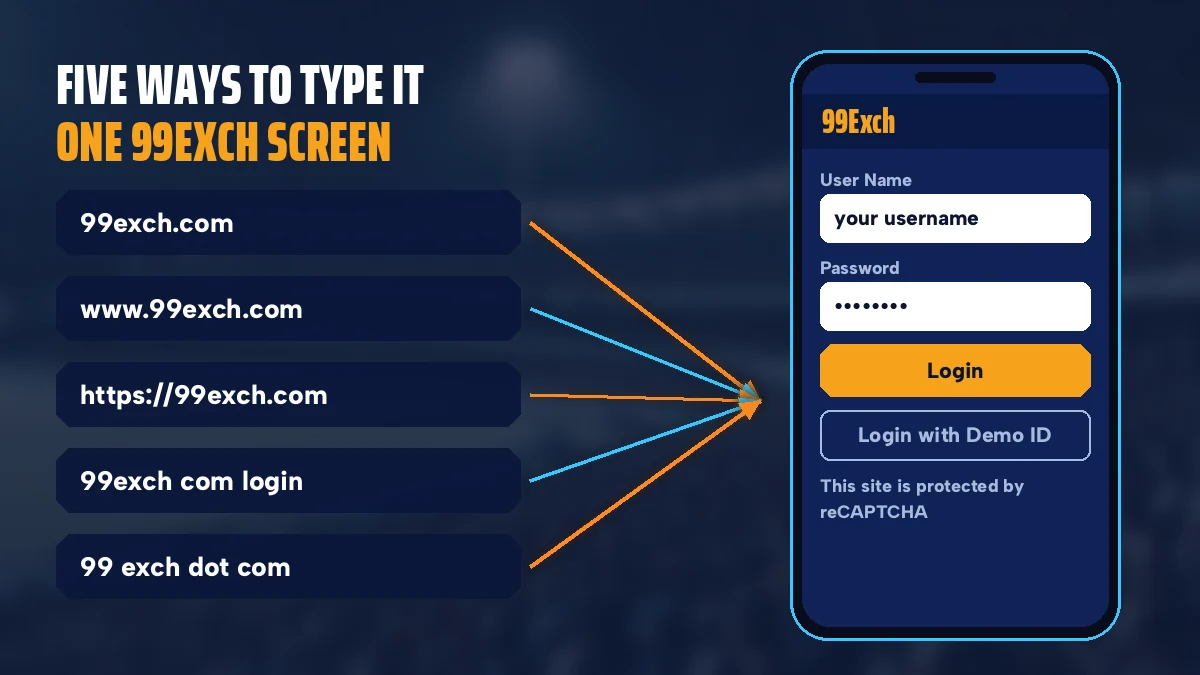
Five people can want the exact same 99Exch screen and type five different things to get there. Some put the bare address in, some paste a full https link from an old chat, some still add an m because a sportsbook they used years ago had a separate mobile site, and quite a few type the words straight into Google with spaces between them, which is a search and not an address at all. The table sorts those habits out.
| What you type | What it really is | What to do with it |
|---|---|---|
| 99exch.com | The bare 99Exch address. The browser fills in the secure prefix for you. | Use it. Our check on 9 Oct 2026, at about 19:02 IST, got the official 99Exch sign-in screen back on this form. |
| https://99exch.com | The full secure form of the same address. | Save this one as a bookmark. It skips one guess the browser would otherwise make. |
| http://99exch.com | The older, unencrypted prefix, usually from a saved link. | Most browsers lift you to https on their own. If a not-secure label stays in the address bar, retype the address with https before the password goes in. |
| 99exch.com/m or an m. in front | A mobile-site habit carried over from other betting sites. | Not needed. The root screen already fits a phone, and our 390px screenshot shows it. We did not log a separate result for the m form, so the root is the one we can vouch for. |
| 99 exch com login, with spaces | A search query. Google returns a list, not the 99Exch screen. | Read the address on each result before tapping. On test day 99exch.in was a third-party ID seller, not the official screen. |
So the short version is boring. Type the root, add https if you like, and leave the m off.
There is one more case the table cannot fix, and that is when 99exch.com does not open at all. That is rarely your phone. An internet provider in India can block a betting address for a day or a week, and 99Exch answers that by running the same sign-in app on other mirrors, so the username and password you already have will work there without any change (the balance is the same too, because it sits with the 99Exch ID, not with the address). The every 99 Exchange Com mirror we tested has every mirror we tested that evening, with the two that failed. We will not repeat it here.
Bookmark once and most of this goes away. On Android, open https://99exch.com, tap the three-dot menu and save it as a bookmark or a home-screen shortcut; on an iPhone, the Share sheet has Add to Home Screen, which is also how 99Exch is used on iOS since there is no APK for it. Either way, you stop typing the address every evening, and a typo in the address bar can no longer drop you on a search page full of lookalikes.
Quick test before blaming the password: if 99exch.com shows the sign-in boxes, the address is fine and the problem is what goes into the boxes. If it shows nothing, a timeout or an error page, the address is the problem and a 99Exch mirror is the fix.
Https 99Exch Com Login on a Phone in Five Easy Moves
On a phone, this is the order that works for a 99Exch sign-in, start to finish, in Chrome or any other browser.
- Open the browser and type https://99exch.com in the address bar, not the search box. Wait for the 99Exch sign-in card to finish loading.
- Tap User Name and type the username the desk sent you. It is 4 to 14 letters and digits, with no spaces anywhere.
- Tap Password and type it in by hand. Copying from the chat works too, but check that no extra space came along at the end.
- Press Login. If what loads is a practice balance, you hit Login with Demo ID by mistake; go back and use plain Login, since the demo view holds no real money and cannot pay out.
- Once the 99Exch home loads, check the balance in the top bar before you place anything. That confirms you are inside your own ID.
The field-by-field detail, the reCAPTCHA note under the card and what each button on that screen does sit on the box-by-box 99Exch login notes, so this section stays short on purpose. One habit matters more than anything else on it. Sign in on the address, not on a search result, because a search result can carry you to a lookalike form that will happily take your password and never open a 99Exch wallet.
Using the app? Same ID. The 22 MB Android build on the 99Exch APK page asks for the exact username and password you would type on 99exch.com, so a reset done for the web works inside the app as well, and the other way round.
Signing in on a laptop is the same five moves, with one difference worth knowing about. Desktop browsers are more eager to save and refill passwords, so the old-password loop described further down shows up more often there than on a phone. Type the new 99Exch password by hand the first time after a reset.
A note on time-outs. The web version of 99Exch signs you out after 20 minutes of doing nothing, and the app after 45. Coming back to a blank card after lunch is not a lockout; it is that timer, and a normal sign-in brings you back.
99Exch Com Login Password Refused? Six Simple Things to Check First
Before writing to anyone, give the screen one minute. Most 99Exch refusals trace back to what went into the boxes rather than the account, and the six cards below are the usual suspects, set out in the order worth checking.
The Phone Added a Capital Letter
Phone keyboards like to capitalise the first letter of anything you type into a box. If the 99Exch password starts with a small letter, look at the first character before you press Login. It is probably the most common slip of the lot.
Count the 99Exch Password Dots
A pasted password can carry one invisible extra character, and the box shows it as one more dot. If the password in the chat has nine characters and the box shows ten dots, delete the last dot and press Login again.
Dots Were Already in the Box
Look at the Password box before you type anything. If dots are sitting there on a fresh visit, the browser put them in, and after a 99Exch reset those dots belong to the old password. Clear the box, type the new one, and let the browser update its copy.
Mixed Up the Second 99Exch Username
Running a second ID on the same number? Find the desk message that carried this password and read the username printed in that same message. That pairing is the only one 99Exch accepts, and the other username will refuse the password every single time.
Lookalike Characters in the 99Exch Password
Zero and capital O, small l and capital I, and the digit 1 look almost the same in some chat fonts. If the password has any of them, try the other reading once. Then stop.
The Form Was Not 99Exch at All
A search result that looks like the 99Exch screen may be someone else's form. Your details will never work there. Check that the address bar says 99exch.com or a mirror from our list.
Sometimes it is the username, not the password. A 99Exch username runs 4 to 14 characters and uses only letters and digits, so if what you typed has a dot, an underscore, a space or a fifteenth character, the problem is in the first box. Fix that before you touch the password. The refusal looks identical either way, which is why people reset a perfectly good password and then fail again with the new one.
One thing to avoid while checking: guessing. Typing five slightly different passwords in a row does not get you closer, it just burns minutes, and the desk does not publish a fixed number of tries on this page, so treat two failed tries as the limit and move to the reset.
A typical case, stitched together from a few chats: someone opens 99exch.com late on a match night, types a password from memory, gets refused, pastes it from the chat, gets refused again. The paste had a trailing space. They message the desk anyway, and the new password is in the chat within three minutes, which is probaly the faster route once the second try fails.
Three Minutes on the 99Exch Desk Clock — A Simple Password Reset Ladder
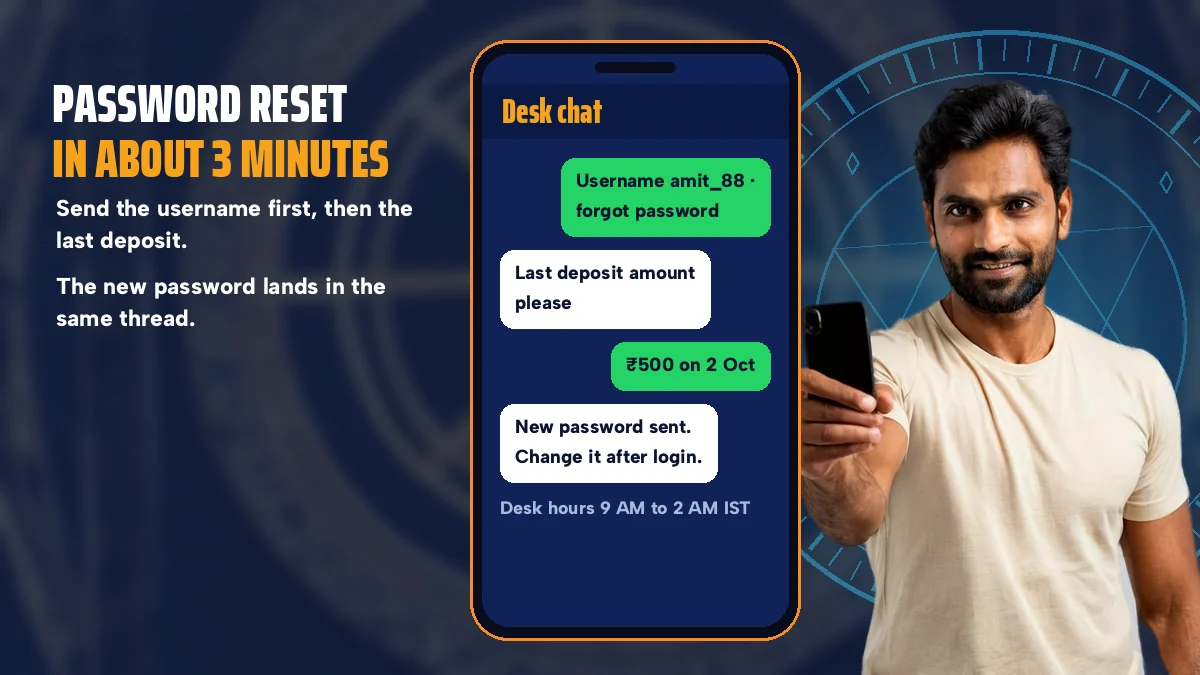
There is no forgot-password link that does this by itself. A 99Exch reset is done by a person at the desk, on WhatsApp, and it takes about 3 minutes from the moment they pick up your message. That last part matters. The desk's median reply time is 4 minutes, so on an ordinary evening the whole thing, from your first message to signing back in on 99exch.com, lands somewhere near seven or eight minutes, give or take a busy patch.
- Minute 0. From the WhatsApp number linked to your 99Exch ID, send one message with your username and the words password reset. Nothing else is needed yet.
- Around minute 4. The desk replies. It checks that the number writing in is the one on the ID. If it is a different number, expect a question about your last deposit amount instead.
- Minutes 4 to 7. Keep the chat open and leave 99exch.com alone while the desk works; another attempt now only muddies things. The replacement shows up as a reply about 3 minutes after the desk starts.
- Right after. Type it into 99exch.com by hand, check the first letter is not capitalised, and press Login.
- Same evening. Delete the old saved password from the browser so it stops filling the box tomorrow.
A sample first message, if you want something to copy: Hi, password reset please. Username: your 99Exch username here. Sending from my registered number. That is it. No screenshots, no old password, no story about the match. The desk needs the username and the number, and it can see the number already.
Keep it in one message. The desk can work fastest when it can see the username and the request together, and a short message gets read sooner than a long one.
Timing also depends on the hour. The 99Exch desk works 9 AM to 2 AM IST every day of the week, and a reset request sent at 3 AM will sit in the chat until the morning shift, which is annoying in the the middle of a series but is how it is set up. The number is +91 81097 11726, shown as text only; the 99Exch com WhatsApp number with its desk hours has the hours and the first-message format in one place.
99Exch Com Login Lockouts and the Wrong-Password Loop — Easy Ways Out
Being stuck outside 99Exch comes in a few shapes, and they look the same from the sign-in screen even though each one has its own exit. A loop is the most irritating one: the right password exists, but something keeps putting the wrong one back in the box. Lockouts are rarer.
- The loop that survives a reset. New password from the desk, still refused. Open the saved-passwords list in your browser settings and search for 99exch; if an entry is there, it holds the old one. Delete it, then type the new password.
- The changed phone number. If the old number is gone, the desk can still recover the ID if you message from the number it was registered on, or give the amount of your last deposit. Recovery detail sits on the 99Exch ID page.
- The address stalls halfway. The card loads, you press Login, and then nothing. That is usually the address being slowed by the provider, so open the 99Exch red mirror and use the same details there.
- The night lockout. Locked out after 2 AM? The desk is offline until 9. Leave the reset message in the chat and it will be near the top when the shift starts.
The tempting fix, opening a fresh account, does more harm then good. Your balance stays on the old 99Exch ID, the new one starts empty, and one number holds only two IDs, so a second account to get round a forgotten password uses up the spare slot for nothing.
Short version. Reset, do not rebuild.
After any reset or recovery, do one small check on the first sign-in. Look at the balance in the 99Exch top bar. If it shows the amount you expect, you are inside the right ID; if it shows zero when you know there is money in the account, you have probably signed in to the second ID on your number, and the fix is the username, not another reset. It takes five seconds and saves a confused chat later.
New to all of this and you never had an ID? Then none of the above applies yet. The 99 Exchange sign-up page covers what the desk needs to open one, and it usually arrives in 6 to 9 minutes.
Trusted 99Exch Com Login Search Words and the Answer Each One Gets Here
People land on this page with slightly different phrases, and each phrase is really a question about the same 99Exch sign-in screen. Here is which part of the page answers which.
Address forms typed before the sign-in card appears
https 99exch com login and http 99exch com login
Both point to the one 99Exch address. The https form is the one to bookmark; the http form usually gets lifted to https by the browser, and the table near the top of this page says what to do if it does not.
99exch com m login and https 99exch com m login
An m in the address is a habit from other sites. The 99Exch root already fits a phone screen, so drop the m and type 99exch.com.
Password phrases that bring a refused sign-in to this page
99exch com login password
A refused password is usually a capital letter, a trailing space or an old saved entry. The six checks above come first, then the 3-minute desk reset.
- 99 exch com login, with the space, reaches the same answer as 99exch com login
- A password reset request goes to the desk, never to a search result
- The same username works on 99exch.com, its mirrors and the app
Which phrase lands on which block of this page
| Phrase searched | Block that answers it |
|---|---|
| 99exch com login | The ticket card and the five-move phone steps |
| https 99exch com login | Row two of the typed-forms table |
| http 99exch com login | Row three of the same table |
| 99exch com m login | Row four, the mobile form |
| 99exch com login password | The six checks and the reset ladder |
Anything about mirrors beyond .com belongs to the dated address list, linked above.
Fast 99Exch Com Login Answers From the Desk Chat
How do I log in to 99 Exch?
Type 99exch.com in your browser, enter the User Name and Password the desk sent you on WhatsApp, and press Login. Do not press Login with Demo ID, which opens a practice view without real money. The same details work on every 99Exch mirror and inside the Android app.
Can I download a 99Exch com ID?
There is nothing to download for the ID itself. The phrase usually means one of two things: getting the ID, which the desk sends as chat text 6 to 9 minutes after sign-up, or getting the 22 MB 99Exch Android app, which asks for that same username and password once installed.
Why is my 99exch com login password refused?
Most refusals come from typing, not from the account. Check for a capital letter added by the phone keyboard, a space copied from the chat, or an old password filled in by the browser. If two careful tries still fail, ask the 99Exch desk for a reset.
Does https 99exch com m login open a different page?
You do not need the m form. The 99Exch sign-in screen at the root address already fits a phone, so type https://99exch.com and sign in there. We tested the root address on 9 Oct 2026, not a separate mobile address, so the root is the one to use.
How long does a 99Exch password reset take?
The reset takes about 3 minutes once the desk picks up your message. The desk usually replies within a median of 4 minutes, so expect roughly seven or eight minutes in total. Send the request from the WhatsApp number linked to your 99Exch ID to keep it quick.
What if I am locked out after the desk closes?
The 99Exch desk works from 9 AM to 2 AM IST every day. A reset request sent outside those hours stays in the chat and gets handled when the morning shift starts. Leave one clear message with your username instead of several, so it is quick to act on.
Will my 99Exch login work if 99exch.com does not open?
It will, on a mirror. The .com address was one of five that served the same 99Exch sign-in screen in our 9 Oct 2026 test, next to .red, .green, .live and .win. Pick any of the other four, enter the username and password you use on .com, and the balance is the one you left.
Why does 99Exch sign me out by itself?
A timer closed the session. On the 99Exch website it runs out after 20 quiet minutes, in the app after 45, so a long rain delay or a dinner break is enough to trigger it. Your password has not changed. Type the same two details in again and the balance comes back.