
99Exch APK — Latest 22 MB Download to Install Before the Toss
Four taps put the 99Exch APK on an Android phone: save the 22 MB file from the Download .apk row, allow your browser to install one outside app, press Install, then sign in with the username you already use in Chrome. Your phone needs Android 7.0 or newer. Nothing else is asked for, no store account and no second file, so the whole thing fits in the quiet stretch between team news and the coin going up.
Install the 99Exch APK on Android 7.0 or Newer
Easy 99Exch APK Install in Four Steps, Done Before the Toss
Every 99Exch APK install on Android runs through the same four screens, whatever brand the phone is. The labels shift a little between Samsung, Xiaomi and the rest. The order never does.
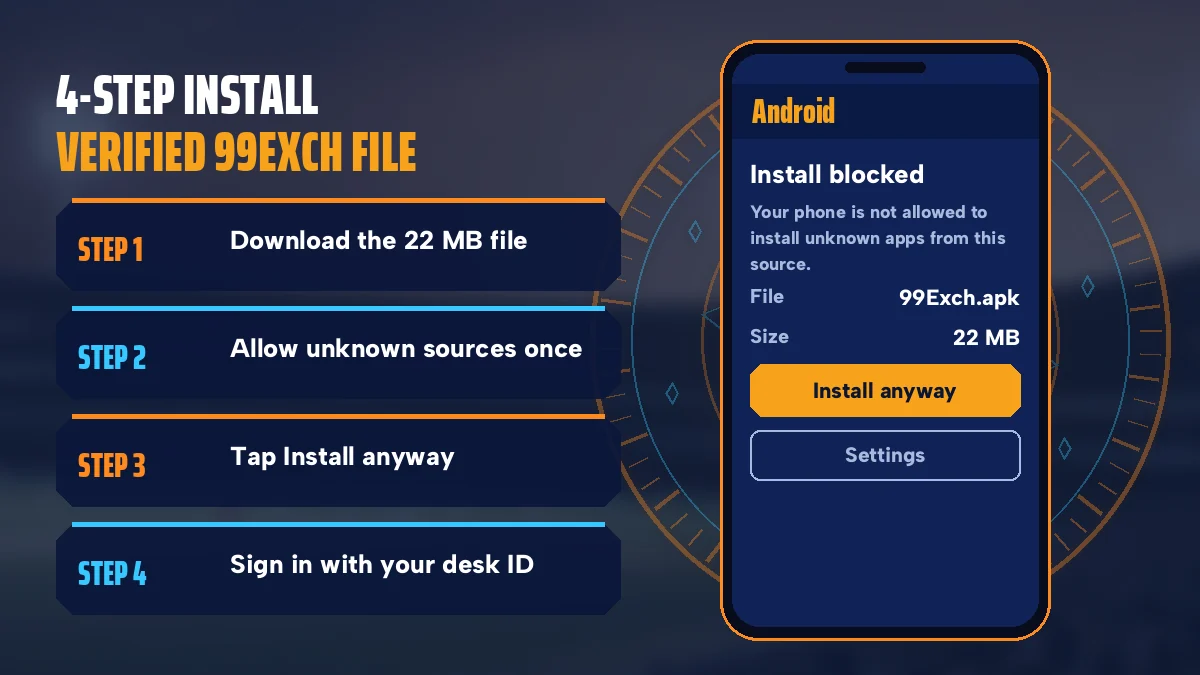
- Download the file. Open the official 99Exch sign-in screen in Chrome and tap the Download .apk row under the Login buttons. A 22 MB file lands in your Downloads folder, small enough that only a weak signal really slows it.
- Allow unknown sources. Opening the 22 MB file triggers a one-time question from Android about letting Chrome install apps that are not from the Play Store. Follow its Settings link, give Chrome that single permission, return with the back key.
- Install. The installer screen returns with the 99Exch name on it. Press Install, wait for the bar, then press Open. If a Play Protect card appears in between, the section on install errors further down explains it.
- Sign in. Type the User Name and Password the desk gave you. Same pair as on the website, same wallet, same open bets. A new player without an ID gets one first through the 99 Exchange sign-up on WhatsApp.
Steps one and four are the 99Exch parts. Steps two and three belong to Android, which is is why most trouble shows up there and not on the 99Exch side at all.
People sometimes expect a fifth step, some kind of registration inside the app. There isn't one. The 99Exch APK is a window onto the account you already hold, so once the login goes through you are looking at your real balance straight away (the Login with Demo ID button is on that screen too, but it only opens a practice board with no real money behind it).
Why the night before beats the toss for a first 99Exch install
The title of this page says before the toss, and that is the latest sensible moment, not the best one. A first-time install has two things that can stall it. The phone may be on Android 6, which no retry fixes, and the account may not exist yet. New IDs come through the desk in 6 to 9 minutes on a normal day, closer to 15 on a busy match evening, so someone who starts the whole thing when the players walk out is cutting it fine. Install the 99Exch APK a day early, sign in once to prove the username works, and on match day the app is just an icon you tap. Updates are a different case; a new build every three weeks or so is a quick job and can wait for the innings break if it has to.
Start Step One — the 22 MB 99Exch DownloadClear 99Exch APK Permission Words: What Android 7 Says Versus Android 8 and Later
Step two confuses more people than every other part of the 99Exch APK routine put together, mostly because Android renamed the switch. Same idea. Different words, in a different menu.
Android 7.0 and 7.1: one 99Exch-wide switch
Older phones keep a single toggle called Unknown sources, usually under Settings and then Security. Turn it on and any app file can install, not only the 99Exch one. Android warns you about that when you flip it. Once the 99Exch app is in, you can switch Unknown sources off again and the app keeps working.
Android 8 onward: permission per app
Newer versions ask about the app that opens the file, not about files in general. The screen is called Install unknown apps, and inside it you pick Chrome (or Files, if you tapped the 99Exch APK from there) and turn on Allow from this source. Only that one app gets the right.
Phone makers rename these screens. On some builds the wording sits under Privacy or Additional settings instead of Security; the shape is the same everywhere, a single yes for a single source, and the installer always sends you to the correct page if you tap Settings on its prompt instead of hunting for it by hand.
A small habit that saves a second trip: allow Chrome, not a file manager you rarely use. Every new 99Exch build arrives through Chrome the same way, and the permission you gave the first time is still sitting there when the next file comes.
Is it risky to leave the switch on? For one source, the browser you trust, most people leave it. Others switch it off after each 99Exch install. Both work.
Clear 99Exch Download APK Troubleshooting: Short File, Old Android, Full Storage
Three messages cover nearly every failed 99Exch download apk attempt the desk hears about on WhatsApp. None of them means the file is broken on the 99Exch end. Each one points to something on the phone, and each has a plain fix.
| Message on screen | Usual cause | What to do |
|---|---|---|
| There was a problem parsing the package | Download cut off before 22 MB, or Android older than 7.0 | Compare the saved size with 22 MB first; short means fetch again, full size means the phone is below 7.0 |
| Blocked by Play Protect | Play Protect flags files from outside the Play Store by default | Tap More details, then Install anyway, only for a file from the Download .apk row |
| App not installed / not enough space | Storage nearly full, or a broken older copy in the way | Free some space, uninstall the old 99Exch app if one is there, install again |
The parse error, in a little more detail
This is the most common of the three by a distance. A typical late message reads something like: file downloaded, tapped it, got a parsing error, now what. More often than not the file is short, because the screen locked or the train went through a tunnel halfway and Chrome saved a stub. Check the size in Downloads. If it says anything well under 22 MB, that is your answer. The other usual case is an old phone on Android 6, and no amount of re-downloading will fix that one, since the 99Exch build simply needs 7.0.
Play Protect, and why it shows up for 99Exch
It tends to appear at step three, just after you press Install and before the progress bar for 99Exch moves. Behind it is Google, not 99Exch: the 99Exch APK has never had a store listing, so the scan has nothing to compare it with and the card comes up by default. A small More details link opens Install anyway. Press that for the file you fetched yourself from a 99Exch sign-in screen, and for nothing else (a copy pushed into a group chat is the mod-file problem two sections down).
Space, and the leftover old copy
22 MB is small, but Android needs room to unpack it on top of the download, so a phone with almost no free storage can still refuse. Clearing a few old videos usualy sorts it. If an earlier 99Exch app that was installed from some other file is still on the phone, Android may refuse to lay the new one over it; uninstall the old one first, then install. Your account lives on the 99Exch side, not in the app, so nothing is lost — the balance and bets are there when you sign back in.
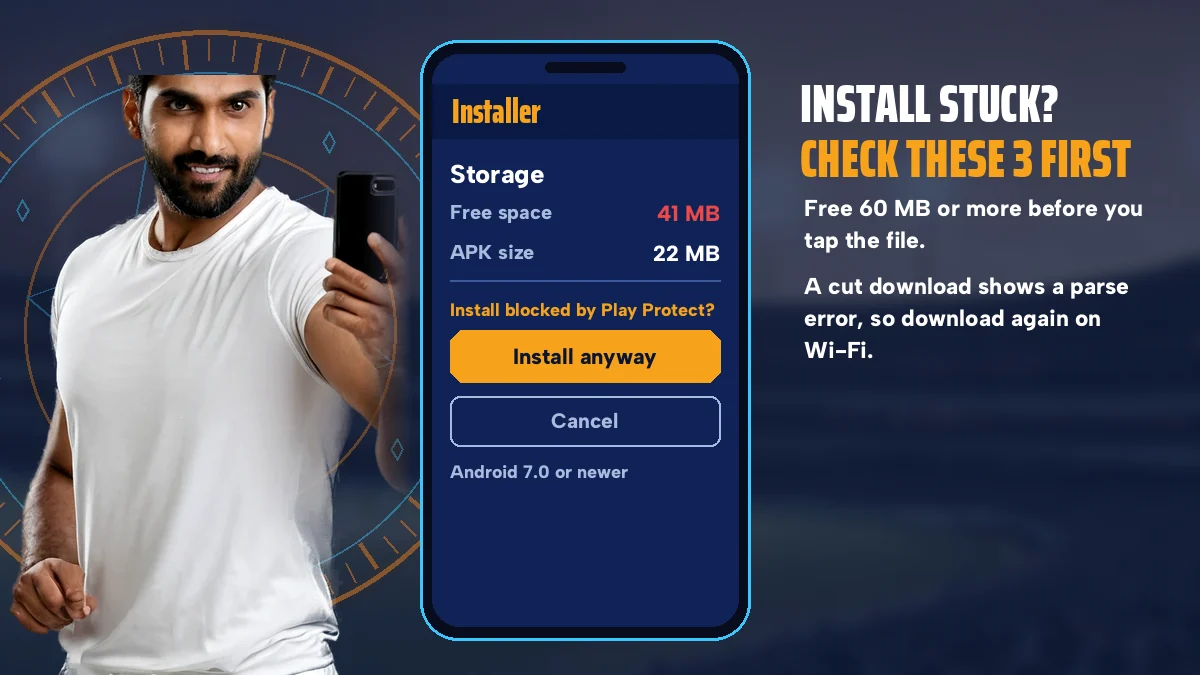
Still stuck after all three? Send the exact wording of the message to the desk. A screenshot is better than a description, and the median desk reply is about four minutes, any day between 9 AM and 2 AM.
Simple 99 Exchange App Map: the Five Live Sections You See After Login
One login buys you 45 idle minutes in the 99 Exchange app before it asks for the password again. The website gives 20. Those minutes get spent across Home, Live, Casino, My Account and Support, and nothing in the 99Exch app sits outside those five.
Home and Live on the 99Exch app
Home is the starting section. Live holds the running matches with match odds, bookmaker, fancy, session and premium markets, and the match list refreshes every 8 seconds; the full market rundown lives on the 99Exch live odds board page.
Casino inside the 99Exch app
A ₹10 stake gets you onto most Casino tables in the 99Exch app; live dealer seats begin at ₹50. Behind that sit 400+ titles and more than 30 live tables, Aviator next to Teen Patti, with Andar Bahar, Dragon Tiger and Lightning Roulette further along.
My Account and Support in 99Exch
My Account is where the balance and wallet sit. Support leads to the WhatsApp desk, the same one behind the Contact On Whatsapp row on the sign-in screen.
For anyone who leaves the phone face-down on the table through a rain delay, that longer idle allowance is the practical difference between the 99Exch app and Chrome, more then any layout change. The field-by-field sign-in behaviour sits on the 99Exch login page with the session timers.
Installing the APK changes nothing about your 99Exch limits. A ₹100 top-up and a ₹500 cash-out floor apply in the app exactly as in the browser; UPI and bank times are listed with the wallet timings on the 99Exch ID page.
No 99Exch APK for iPhone, and what iOS users do instead
iOS will not open an APK. Ever. Any 99Exch APK link aimed at iPhone owners is therefore pointing at something that is not the app. What works on an iPhone is a Safari shortcut: load the official 99Exch sign-in address, press Share, pick Add to Home Screen, keep or change the name. The icon that appears jumps straight to the User Name and Password boxes. Because it is the website wearing an icon, the 20-minute web idle rule applies, and the three-week build cycle does not touch it at all.
Verified Latest 99Exch App Download APK: the Current Build and Its 3-Week Rhythm
A new 99Exch APK build comes out roughly every three weeks. That number shapes how you should think about the file on your phone. If you saved a copy in Downloads back in summer and kept it for reinstalls, it is probably three or four builds behind by now, and installing it on a new phone gets you an older 99Exch app than the one your friend is running.
New phone, reset phone, or a friend setting it up for you? Skip the copy sitting in Downloads. A fresh tap on the Download .apk row means the 99Exch app download you install is the build being served that day, not one from two months back.
Got the new file? Tap it from the notification shade or Downloads. This time Android skips the permission screen, since Chrome kept the right you granted on day one, and the prompt wording changes too: it asks whether you want to install an update to the existing 99Exch application rather than a new one. Say yes. Some builds keep you logged in straight through the swap, others drop you back at the User Name box; either way its a moment with your username in front of you.
Which address do you download from? Any of the working ones. The official sign-in app on 99exch.com, .red, .green, .live and .win all served the same build when they were tested on 9 October 2026, so the file behind each Download .apk row matches. India blocks betting domains at the ISP level from time to time, which is why several 99Exch addresses exist, and the same ID and balance work on all of them.
How do you know an update has landed? Hard to say from the outside. The app does not always flag it loudly. In practice, if the 99Exch app starts acting odd after a few weeks — a screen that will not load, a market that looks frozen — getting the latest build is the first thing to try, then the desk.
A slower check, for anyone who likes certainty: compare the size and date of the newest file in Downloads with the one you installed last. Different date, newer file. Install it.
Trusted 99Exch Com APK Only: Why Mod and Black Copies Never Come From the 99Exch Desk
Search for this file long enough and you will find a 99Exch black APK, a mod APK, sometimes a version with unlocked something-or-other in the name. None of these come from the 99Exch desk. Not one.
The only 99Exch com apk the desk stands behind is the verified build behind the Download .apk row on the official sign-in screen, the one this page has been describing all along, and any file that arrives by forwarded link, by a group admin, or from a download site with a different name on it is a copy someone else built for reasons of their own. You cannot see what was changed inside it. The desk cannot either.
- A modified build may ask you to log in somewhere other than the official 99Exch screen, which hands your username and password to whoever made it.
- It may show balances or odds that are not what the 99Exch exchange is actually holding.
- Whatever goes wrong inside a copied file is outside anything the 99Exch desk can see or fix.
Mod builds also make a promise the real 99Exch exchange never does. They hint at an edge: changed odds, a hidden market, free credit. The real app shows the same prices as the browser, because both read the same exchange. That is the whole point of it.
So the test is simple enough. Where did the file come from? If the answer is not the Download .apk row on a 99Exch sign-in screen you opened yourself, delete it and fetch the real one. If you are unsure whether the copy already on your phone is genuine, uninstall it, download fresh, and sign in again; the account is held by 99Exch, so your balance is waiting either way.
Friends can still share the proper file. The sign-in screen even carries a Share This Apk to Friend row, which is a far better starting point than a file that has sat in a chat thread for weeks.
- 99exch app download apk
- 99Exch APK latest version
- 99exch download apk latest version
- 99 exch download for android
- 99exch app for android
- 99 exchange apk
- 99exch black apk
- 99exch APK old version
- 99exch sign up app
- 99 exch how to login
Official 99Exch APK Phrases People Type, From 99 Exchange APK to 99Exch Com APK
How a 99exch app download apk search ends at the four-step block above
Open the install words
Most visitors arrive typing 99exch apk, 99exch download or 99exch download apk, and a fair share add the full 99exch app download apk latest version string. All of them want the same thing: the 22 MB file from the Download .apk row and a clean install on Android 7.0 or newer.
Where the 99 exchange apk and 99 exchange app spellings land on this install page
Open the spelling notes
Some people write the brand out in full, so 99 exchange apk and 99 exchange app turn up as often as the short form. Same file, same 99Exch app, same five sections once you sign in.
Why a 99exch com apk search points to the same verified file here
Open the address note
Adding com to the search does not change anything. The 99exch com apk is the build served on every working 99Exch address, and the 99exch app download from .red or .green gives you the identical file.
What a repeat 99Exch download needs before you tap the row again
Open the repeat-install checklist
Run these three checks on the phone first:
- Android version is 7.0 or newer
- Chrome still has permission to install unknown apps
- The old copy, if it came from another source, is uninstalled
| What was typed | Part of this page that answers it |
|---|---|
| 99exch apk / 99exch app download apk | The four install steps beside the phone screen |
| 99exch app / 99 exchange app | The five-section app map after login |
| 99exch download apk latest version | The three-week build rhythm |
| 99exch com apk | The verified-build section on mod copies |
Quick 99Exch APK Answers on Versions, OBB Files and iPhone
Where do I get the 99Exch APK latest version download?
Get it from the Download .apk row on the official 99Exch sign-in screen. That row always serves the current build, and a new one appears roughly every three weeks. Avoid reinstalling from an old file saved in Downloads, because it may be several builds behind the version your account expects.
Can I do a 99 Exch download for Android 6 or older?
No. The 99Exch APK needs Android 7.0 or newer, and older phones show a parsing error when you tap the file. Check the version under Settings and About phone first. On an older handset, sign in through the mobile browser instead, using the same username and password the desk gave you.
Is a 99Exch black APK or mod APK from the desk?
No. The desk only stands behind the verified build from the Download .apk row on the official 99Exch sign-in screen. Black or mod copies are built by someone else, can send your login details elsewhere and may show figures that are not real. Delete any such file and download the genuine one.
Is the 99Exch com APK latest version the same file on other addresses?
Yes. When tested on 9 October 2026, 99exch.com, .red, .green, .live and .win all served the same official sign-in app, so the file behind each Download .apk row matched. Use whichever address opens for you; the same ID and balance work in the app either way.
Does the 99Exch APK need an OBB file?
No OBB is involved at all. The 22 MB download is the complete 99Exch app, read by the Android installer in one pass, with no Android/obb folder to fill afterwards. OBB packs belong to heavy mobile games. A file sold or shared as a 99Exch OBB is not something the desk publishes.
Is there a 99Exch APK for iPhone?
No, because iPhones cannot install APK files. iOS users open the official 99Exch sign-in address in Safari, tap Share, then Add to Home Screen. That leaves an icon which opens the sign-in screen directly, and the same User Name and Password work there, with the website idle timer applying.